Exploring MCP Servers with GitHub Copilot
Pamela Fox
pamelafox.github.io/github-copilot-mcp-skills-workshop


About me
Pamela Fox
Principal Cloud Advocate at Microsoft / GitHub
Formerly: UC Berkeley, Coursera, Khan Academy, Google
| 🔗 @pamelafox | |
| 🔗 linkedin.com/in/pamela-s-fox | |
| GitHub | 🔗 github.com/pamelafox |
| Website | 🔗 pamelafox.org |

About you
Turn to your neighbor and introduce yourself:
- Name
- Location
- What sessions have you liked so far at the conference?
- What's your favorite coding agent or model?
- Make up a new meaning for "MCP" (e.g. "More Coffee Please")
Today's agenda
| Time | Format | Activity |
|---|---|---|
| 11:00–11:15 | Welcome | Introductions, GitHub Copilot, and Codespaces |
| 11:15–11:25 | Exercise | Set up environment and GitHub Copilot |
| 11:25–11:45 | Presentation | MCP: Model Context Protocol |
| 11:45–12:00 | Exercise | Connect GitHub Copilot to an MCP server |
| 12:00–12:10 | Presentation | Authenticated MCP servers |
| 12:10–12:30 | Exercise | Connect GitHub Copilot to GitHub MCP server |
| 12:30–12:40 | Presentation | Agent skills |
| 12:40–12:55 | Exercise | Run agent skills in GitHub Copilot |
| 12:55–1:00 | Presentation | Next steps |
GitHub Copilot, wherever you work
VS Code
Chat and agent mode in your editor, right next to your code.
Copilot CLI
An agent in your terminal that reads files and runs commands.
Copilot app
A standalone app for working with Copilot outside the editor.
Cloud agents
Assign a task on GitHub, and Copilot works in the cloud and opens a pull request.
Try Cloud Agents on your own later.
GitHub Codespaces
- A cloud development environment with VS Code in your browser
- Built from the repository's dev container: Python, uv, dependencies, and extensions are ready to go
- Nothing to install on your laptop
- Personal accounts include a free monthly quota
- Use VS Code or Copilot CLI inside it; the Copilot app can't be used in a codespace
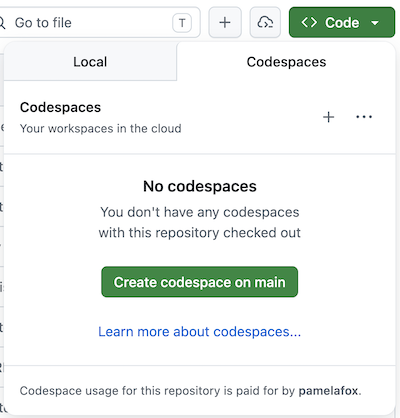
Exercise 1:Set up environment and GitHub Copilot
GitHub repository: 🔗 github.com/pamelafox/github-copilot-mcp-skills-workshop
Open full exercise: 🔗 exercise1.md
Exercise steps:
- Fork the workshop repository into your account.
- Choose Codespaces, a Dev Container, or a local environment.
- Install dependencies and verify Python.
- Open Copilot in VS Code, CLI, or the Copilot app.
- Confirm that Copilot recognizes the workshop repository.
MCP: Model Context Protocol
AI agents
An AI agent uses an LLM to run tools in a loop to achieve a goal.
Agents are often augmented by:
- Context from files, docs, or databases
- Memory across a session or project
- Human approvals and feedback
AI agents are used on a daily basis
Coding agents
GitHub Copilot · Claude Code · Codex · Pi
Chatbots
ChatGPT · M365 Copilot · Gemini
Assistants
OpenClaw · Hermes · Meta Muse · Grok Bot
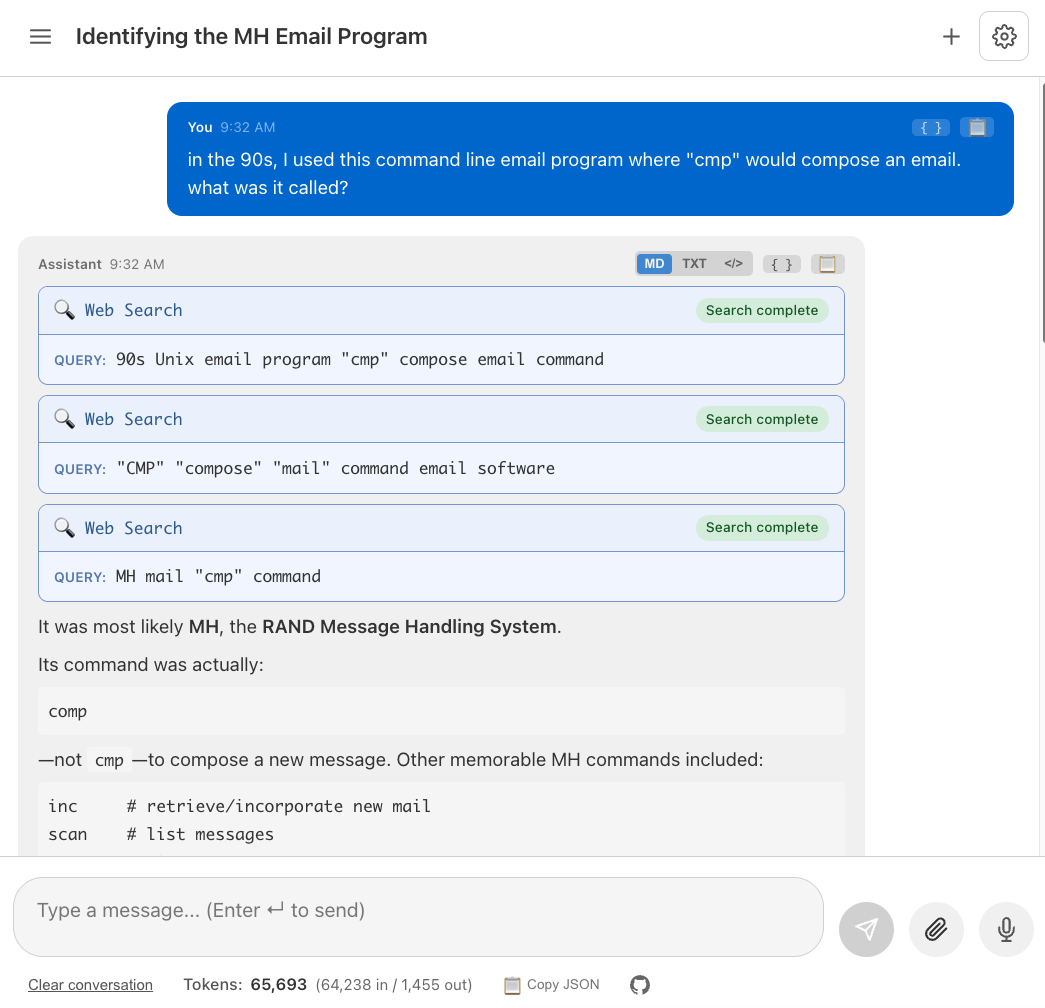
Build your own agents
You can build your own agents in any language, with frameworks like:
LangChain
 Python
 JavaScript
Microsoft Agent Framework
- Python
 .NET
.NET Go
Go
Pydantic AI
- Python
The agentic loop in action
find_customer("Pamela")get_last_order("cust_42")check_inventory(items)find_substitute("baguette")Agents rely on LLM tool-calling
LLMs have been trained to know how to "call tools".
- LLM sees the available tools and their descriptions.
- LLM suggests a tool name and arguments.
- Agent runtime runs the actual code.
- Tool result is sent back to the LLM as context.
- LLM decides whether to call another tool or answer.
The model does not execute the tool.
The runtime does.
MCP: Model Context Protocol
MCP is the open standard that tells agent runtimes how to discover and connect to the tools they can call.
🔗 MCP specification: modelcontextprotocol.io
MCP architecture
MCP client/server request flow
MCP clients
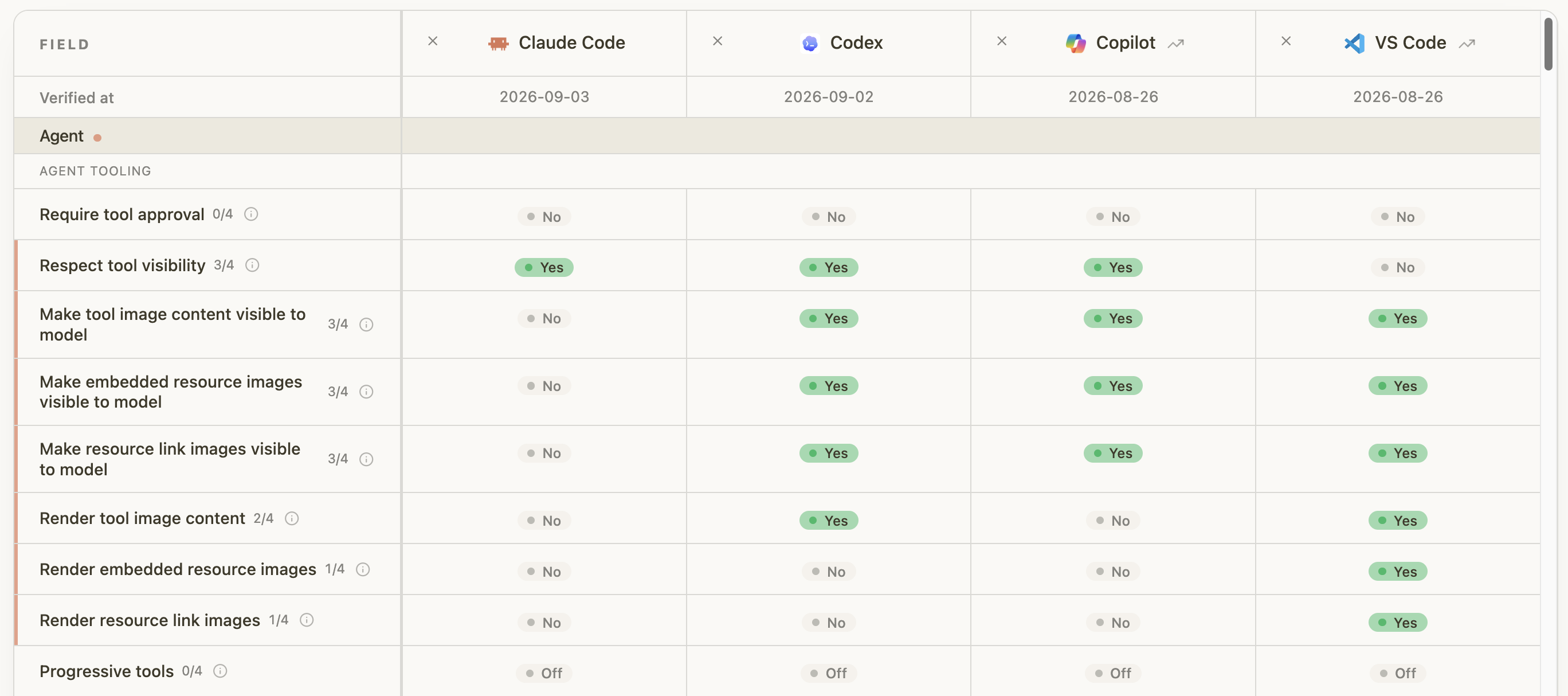
Support for MCP features varies across MCP hosts:
Configure VS Code with public MCP server
Add to .mcp.json
{
 "mcpServers": {
  "microsoft-learn": {
   "type": "http",
   "url": "https://learn.microsoft.com/api/mcp"
  }
 }
}
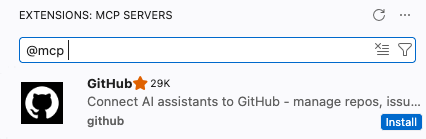
Or install from Extensions
Search @mcp in the Extensions view:
Configure Copilot CLI with public MCP server
Add remote servers to your Copilot CLI user configuration.
1. Add the server
copilot mcp add --transport http microsoft-learn https://learn.microsoft.com/api/mcp2. Verify the server
Start Copilot CLI:
copilotThen run:
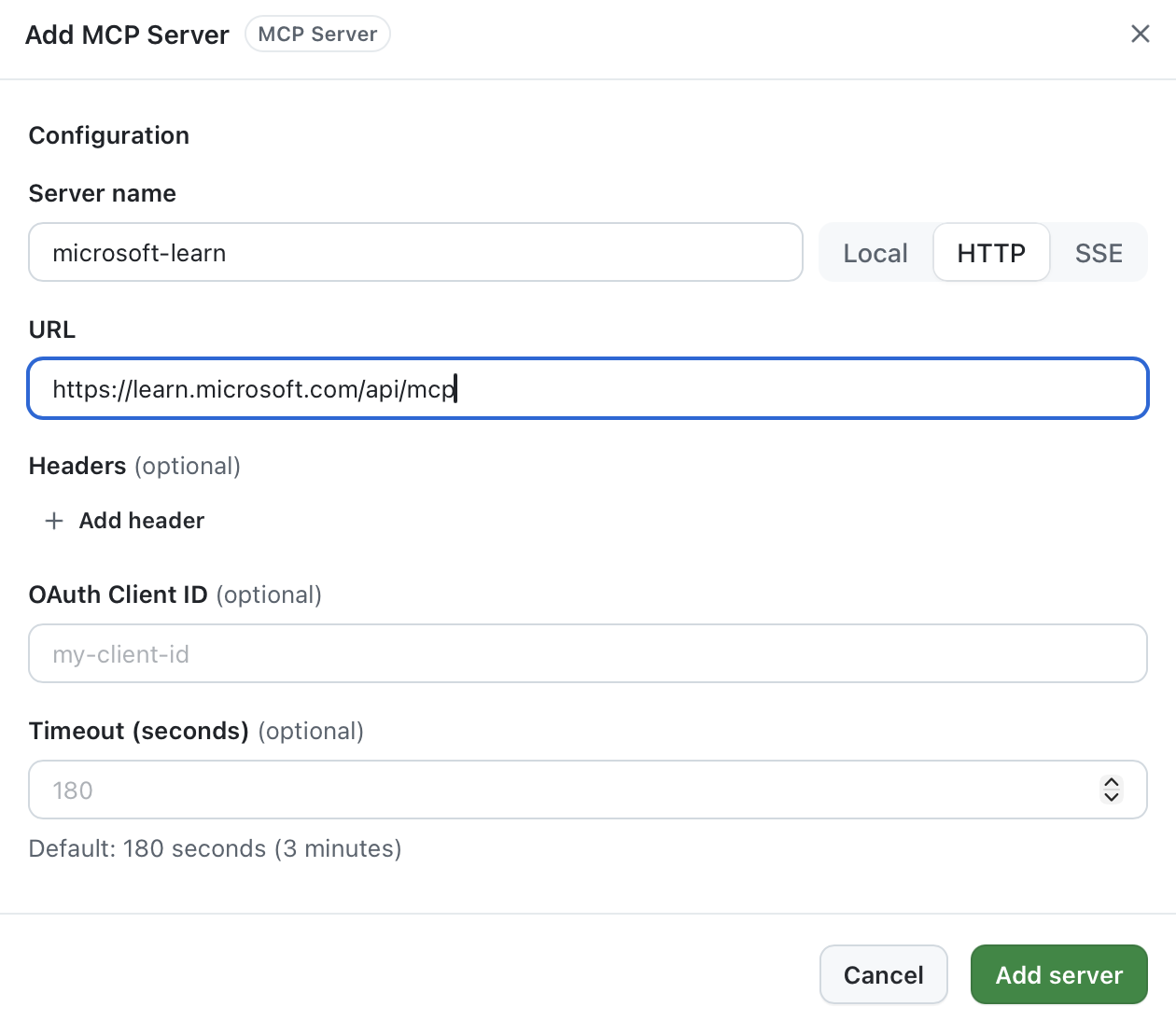
/mcp show microsoft-learnConfigure Copilot app with public MCP server
https://learn.microsoft.com/api/mcp
Adding an MCP server is a trust decision
An MCP server gives the agent new abilities, and it acts with your access.
🖥️ Who runs it?
Local servers run code on your machine. Remote servers see every request you send.
🔧 What can it do?
Some tools only read. Others change files, repositories, or shared services.
📥 What comes back?
Tool descriptions and results are untrusted input that can steer the agent.
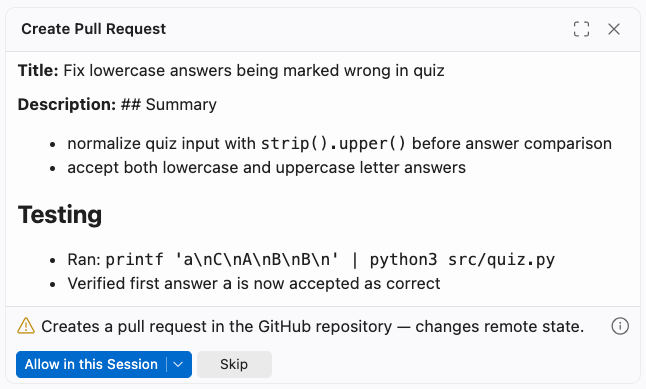
when you connect a server, and each time a tool is called.
Approving a tool call
 1
2
3
4
1
2
3
4
Exercise 2:Connect GitHub Copilot to an MCP server
GitHub repository: 🔗 github.com/pamelafox/github-copilot-mcp-skills-workshop
Open full exercise: 🔗 exercise2.md
Exercise steps:
- Connect the Microsoft Learn MCP server.
- Inspect tool schemas before using them.
- Run one grounded documentation query.
Authenticated MCP servers
How MCP servers restrict access
The server decides how you prove access. You'll see one of these:
Private network
The server is only reachable from inside a company network or VPN.
You: connect from the right network. No sign-in prompt.
Key-based access
You paste an API key or token, and the client sends it in a header.
Watch out: keys can leak. Never commit them to .mcp.json.
OAuth-based access
You sign in through the browser, and the client stores a token for you.
Example: GitHub MCP, which also accepts a personal access token.
What happens when you sign in
Every request carries your token
After sign-in, the client sends your token with each tool call:
Authentication vs. authorization
Authentication
Proves who you are, usually with OAuth in the browser. Some clients also accept a personal access token.
GitHub example: your GitHub account, plus any org SSO policy.
Authorization
Decides what each call may read or change, based on your account's permissions.
GitHub example: the repositories and orgs you can access.
GitHub MCP server
 GitHub's official MCP server connects agents to the GitHub platform.
- Remote: hosted by GitHub at
https://api.githubcopilot.com/mcp/ - Local: run it with Docker or a binary
- Sign in: OAuth or a personal access token
GitHub groups its tools into toolsets, for example:
Repositories
repos
Browse code, search files, read commits
Issues & PRs
issues pull_requests
Create, triage, review, and update
Actions
actions
Check workflow runs and build failures
Security
code_security dependabot
Review code scanning and Dependabot alerts
Authenticated servers can expose write tools
Read and write tools carry different kinds of risk.
👀 Read
- Can expose private source or metadata
- Can ingest untrusted issue text
- Still deserves review
- Example:
get_file_contents
✏️ Write
- Changes shared state
- Can notify or affect other people
- Verify target and payload
- Example:
create_pull_request
Remember: You can configure agents to require approvals for all write tools.
Exercise 3:Connect GitHub Copilot to GitHub MCP
GitHub repository: 🔗 github.com/pamelafox/github-copilot-mcp-skills-workshop
Open full exercise: 🔗 exercise3.md
Exercise steps:
- Connect GitHub MCP with authenticated tools.
- List and choose an open quiz issue.
- Run and repair the quiz locally.
- Commit the focused change to your fork.
- Open a pull request to the workshop repository.
Agent skills
What is an agent skill?
A folder with SKILL.md instructions, plus optional scripts, references, and assets.
Folder layout
pdf-processing/
├── SKILL.md
├── scripts/
│   └── extract.py
├── references/
│   └── REFERENCE.md
└── assets/
SKILL.md
---
name: pdf-processing
description: Extract PDF text, fill forms,
  merge files. Use when handling PDFs.
---

# PDF processing

1. Run scripts/extract.py on the file.
2. See references/REFERENCE.md for
form field details.How coding agents run skills
1. Discover
Only each skill's name and description are in context.
2. Activate
When a task matches a description, the agent reads the full SKILL.md.
3. Execute
Scripts, references, and assets are loaded only as needed.
not over-activated or under-activated.
Where skills live
Project level
.agents/skills/pr-summary-report/SKILL.md
Committed with the repository and shared with everyone who works on it.
Copilot also reads .github/skills/
User level
~/.agents/skills/my-skill/SKILL.md
Available across all of your projects.
Copilot also reads ~/.copilot/skills/
Third-party skills
Option 1: GitHub CLI
gh skill install mattpocock/skillsOption 2: skills CLI
npx skills add mattpocock/skillsBoth let you choose where to install: project or user level, and for which agents.
Discovering skills
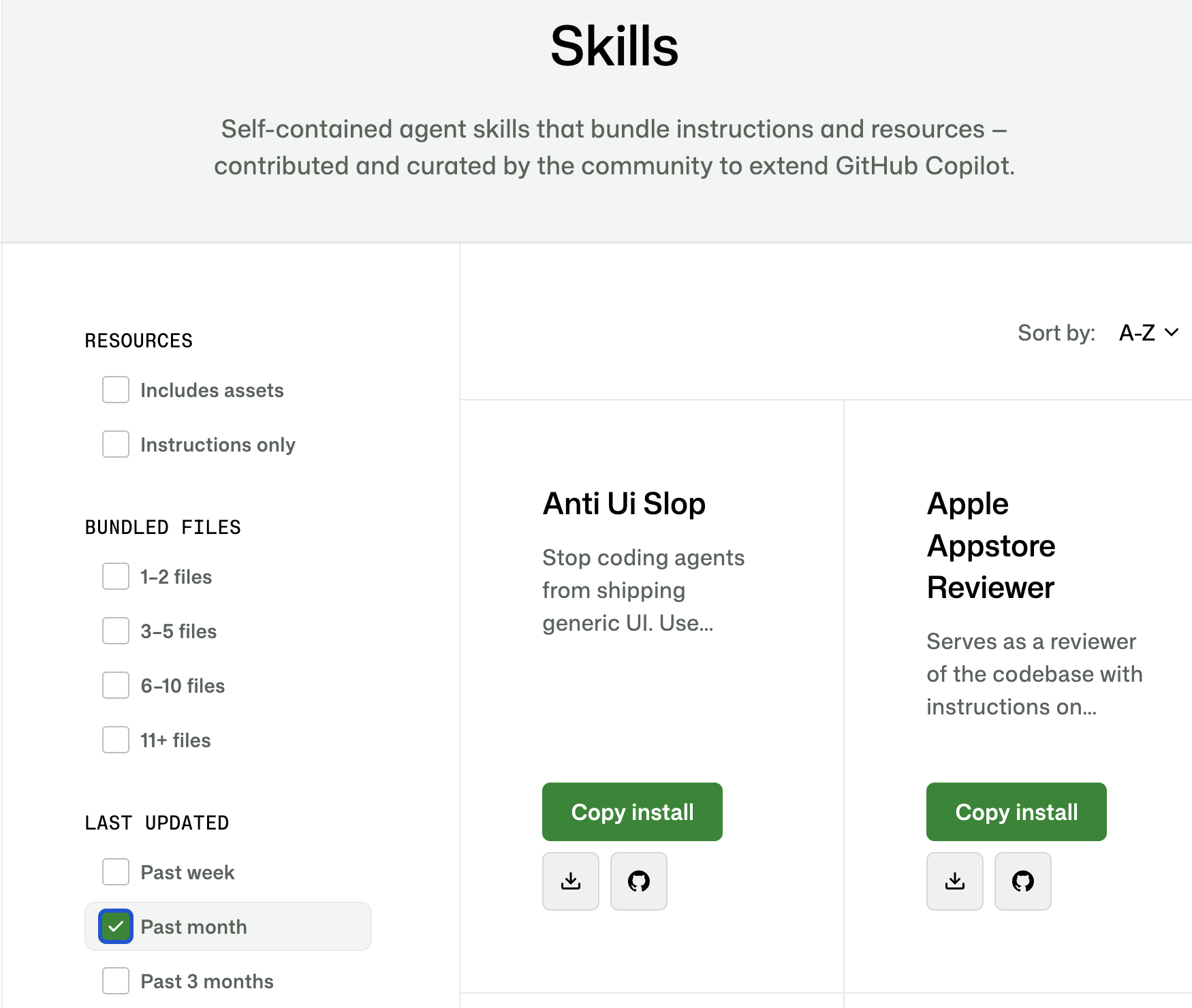
Browse directories
- 🔗 awesome-copilot.github.com/skills
Community-curated skills for Copilot - 🔗 skills.sh
Directory of skills for many agents
Search from your command line
gh skill search <topic>
Search GitHub for skillsgh skill preview <repo> <skill>
Read a skill before installing it
Skills over MCP
An official MCP extension lets servers ship skills alongside their tools.
How it works
- Server declares the skills extension
skills/listreturns each skill's frontmatter and file list
Why it helps
- Instructions live with the service they describe
- Skill updates ship with the server
Example: GitHub MCP server
Proposed skills for potential future release:
address-pr-feedbackdebug-cifix-dependabotprepare-releasereview-prsecurity-audittriage-issuestrigger-workflow
Agent plugins
An open standard for packaging skills and MCP servers into one portable plugin.
my-plugin/
├── plugin.json
├── skills/
│   └── skill-name/
│       └── SKILL.md
├── mcp.json
└── com.github.copilot/
    └── hooks/
└── hooks.jsonplugin.json: names the plugin and the spec version it targetsskills/: Agent Skills, in the standard formatmcp.json: MCP servers to connect- Client-specific folders such as
com.github.copilot/: optional extras like hooks; other clients ignore them
Skill, MCP server, or plugin?
Exercise 4:Run agent skills in GitHub Copilot
GitHub repository: 🔗 github.com/pamelafox/github-copilot-mcp-skills-workshop
Open full exercise: 🔗 exercise4.md
Choose one or more activities:
- Inspect and run the project's
/pr-summary-reportskill. - Inspect and run a built-in Copilot client skill.
- Install Matt Pocock's skills and try
/codebase-design. - Create and test a
/quiz-question-reviewerproject skill.
Next steps
Learn more: GitHub Copilot
🎥 VS Code + GitHub Copilot
Videos covering Copilot features and workflows in VS Code.
🎥 GitHub Copilot app
Meet the AI desktop assistant and see how it fits into your workflow.
🎥 GitHub Copilot Day
Sessions and demos spanning the GitHub Copilot product family.
🎥 GitHub Copilot CLI
A beginner-friendly walkthrough of Copilot in the terminal.
Learn more: MCP
🎥 MCP Live
Rewatch sessions covering the latest MCP tools, patterns, and integrations.
Thank you
Questions?
| 🔗 @pamelafox | |
| 🔗 linkedin.com/in/pamela-s-fox | |
| GitHub | 🔗 github.com/pamelafox |
| Website | 🔗 pamelafox.org |
Workshop repository:
🔗 github.com/pamelafox/github-copilot-mcp-skills-workshop