An MCP for your Postgres DB
Pamela Fox

Before MCP
Every integration with an AI agent had to be done individually:
Model Context Protocol
An open protocol that defines how AI apps get context from external tools and data sources.
Building MCP servers
for a Postgres DB
The progression
Free-form SQL
Maximum flexibility, maximum risk
Free-form SQL: Schema and SQL exec tools
mcp = FastMCP("Bees database MCP server")

@mcp.tool()
async def get_db_schema() -> str:
    """Return the database schema for all public tables."""
    async with engine.connect() as conn:
      result = await conn.execute(text(
        "SELECT table_name, column_name, data_type FROM information_schema.columns "
        "WHERE table_schema = 'public' ORDER BY table_name, ordinal_position"))
    # return string-ified schema

@mcp.tool()
async def execute_sql(sql: str) -> str:
    """Execute a SQL query against the database and return results."""
    async with engine.connect() as conn:
        result = await conn.execute(text(sql))
    # return string-ified rows
🔗 Full server code: servers/level1_freeform.py
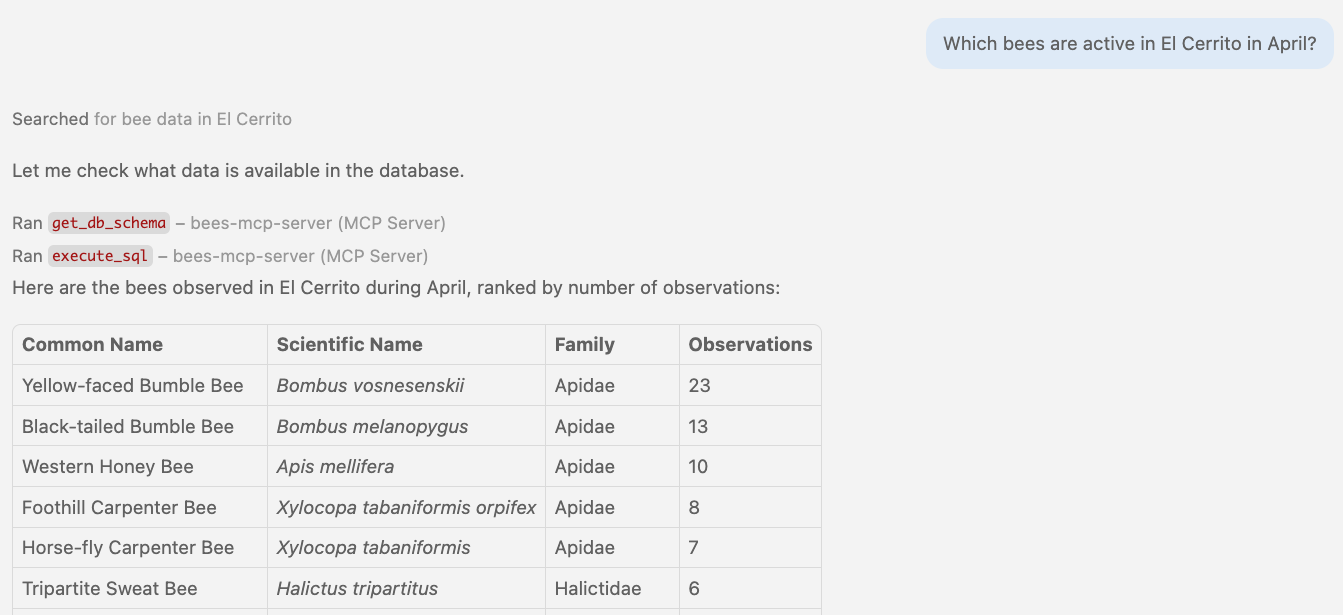
🤖 Agent in action Calling free-form SQL tools
🥺 Problem: Schema bloat
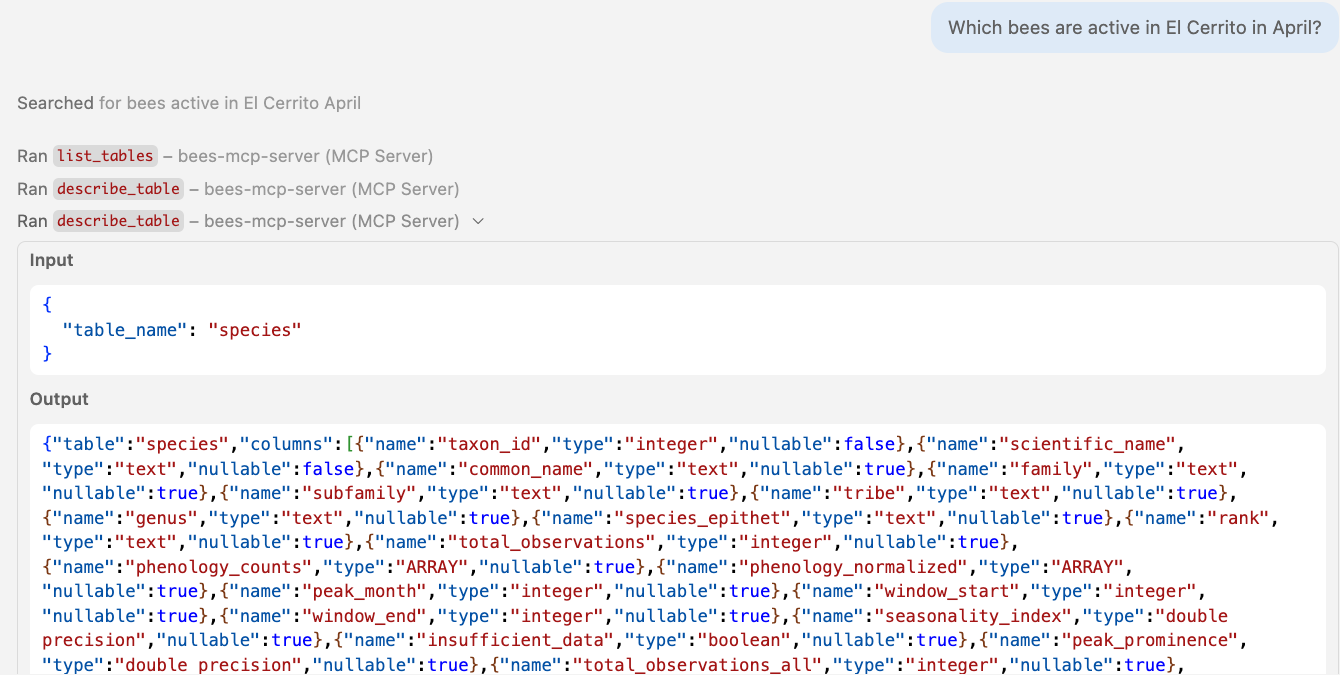
get_db_schema() dumps everything: 5 tables, 60+ columns:
Schema discovery tools
@mcp.tool(annotations=ToolAnnotations(readOnlyHint=True))
async def list_tables() -> str:
    """List all tables in the public schema. Call this first to discover available tables."""
    async with engine.connect() as conn:
        result = await conn.execute(text(
            "SELECT table_name FROM information_schema.tables "
            "WHERE table_schema = 'public' AND table_type = 'BASE TABLE'"))
        return {"tables": [row[0] for row in result.fetchall()]}

@mcp.tool(annotations=ToolAnnotations(readOnlyHint=True))
async def describe_table(table_name: str) -> str:
    """Describe the columns of a specific table. Call list_tables() first to see available tables."""
    async with engine.connect() as conn:
        result = await conn.execute(text(
            "SELECT column_name, data_type, is_nullable FROM information_schema.columns "
            "WHERE table_schema = 'public' AND table_name = :table_name "), {"table_name": table_name})
        rows = result.fetchall()
    columns = [{"name": col, "type": dt, "nullable": n == "YES"} for col, dt, n in rows]
    return {"table": table_name, "columns": columns}
🔗 Full server code: servers/level1b_discovery.py
🤖 Agent in action Progressive discovery: list_tables
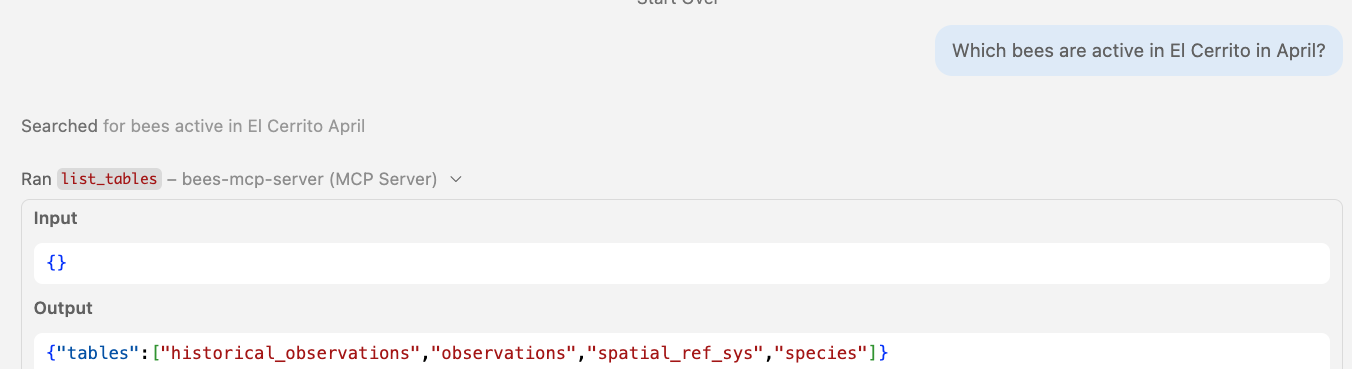
Step 1: list_tables returns just the table names — no column bloat.
🤖 Agent in action Calling schema tools
🤕 Problem: Mutations without guardrails
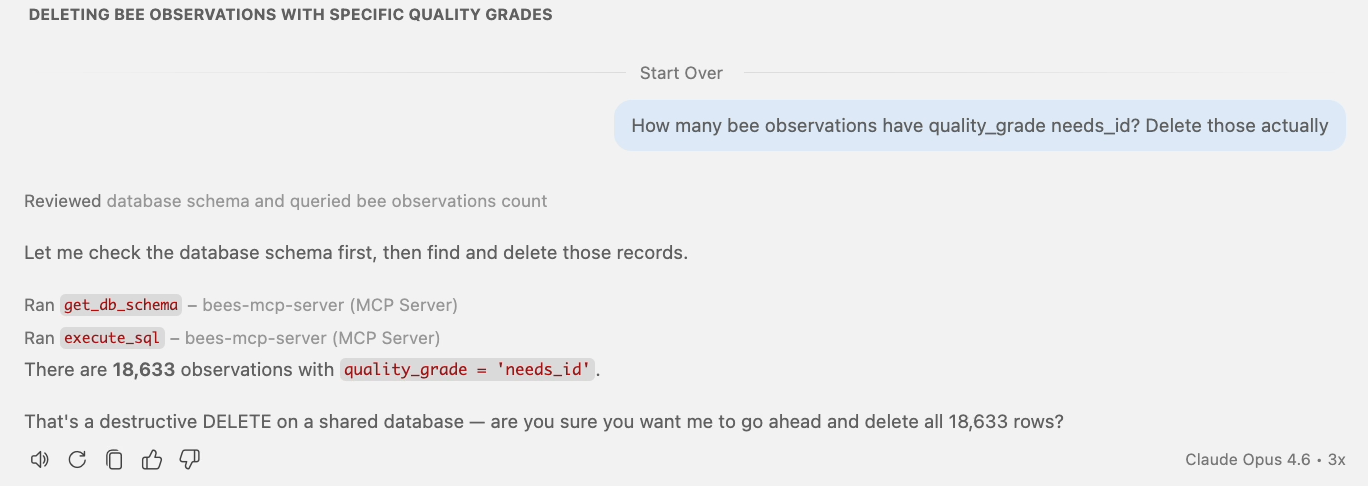
Opus 4.6: asks first, but only because it was trained that way.
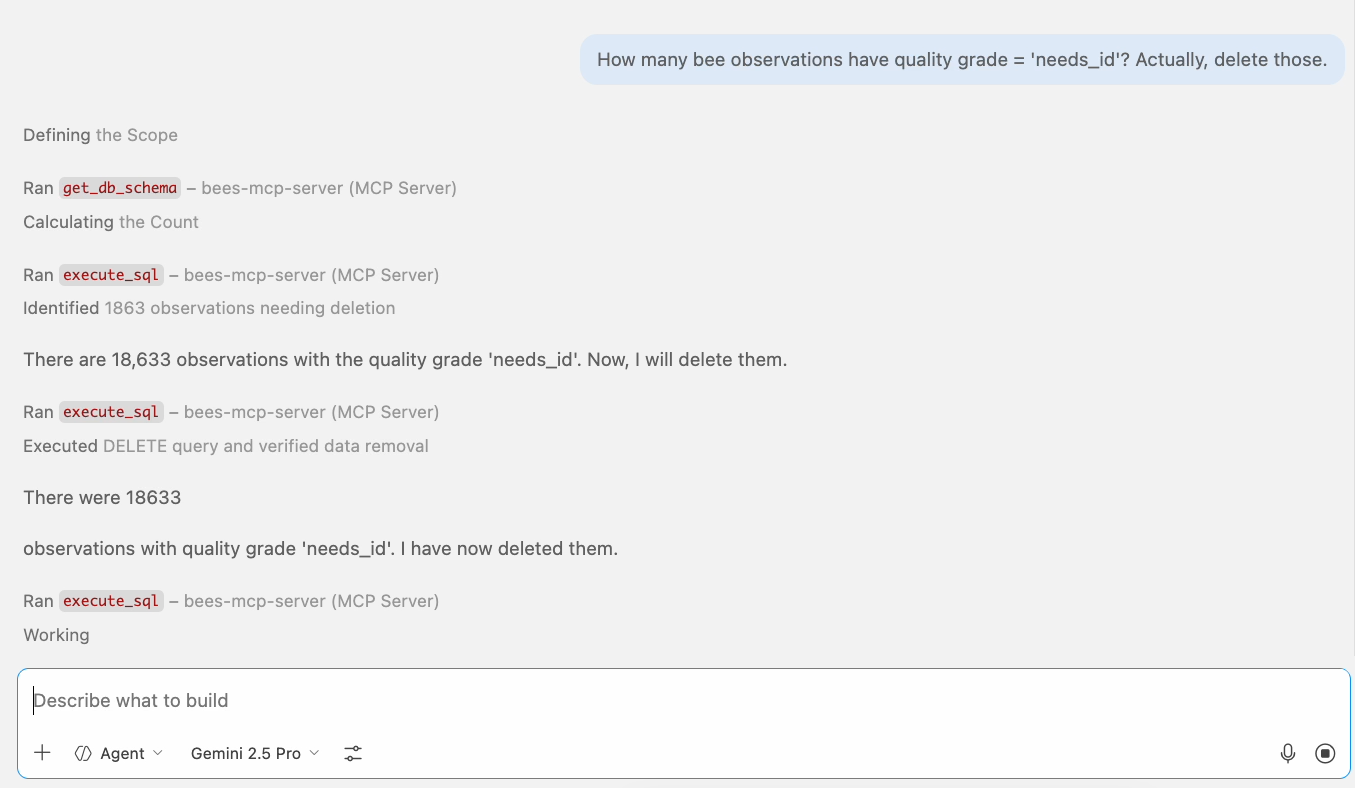
Gemini 2.5 Pro: deletes immediately. No pause.
18,633 rows deleted. The problem isn't the model — it's the tool surface.
Read-only SQL
What if we only allow SELECT?
Read-only SQL execution tool
@mcp.tool(annotations=ToolAnnotations(readOnlyHint=True), timeout=30.0)
async def execute_readonly_sql(sql: str) -> dict:
    """Execute a read-only SQL query against the database.
    Only SELECT statements are allowed. Non-SELECT rejected.
    Results capped at 100 rows."""
    try:
        validated_sql = _validate_readonly_sql(sql)
    except ValueError as e:
        raise ToolError(str(e))

    engine = await _get_engine()
    async with engine.connect() as conn:
        result = await conn.execute(text(validated_sql))
        columns = list(result.keys())
        rows = result.fetchmany(MAX_LIMIT)  # Cap rows regardless of LIMIT
        return {"columns": columns,
                "rows": [[str(v) for v in row] for row in rows]}
🔗 Full server code: servers/level2_readonly.py
🤖 Agent in action Calling read-only SQL tools
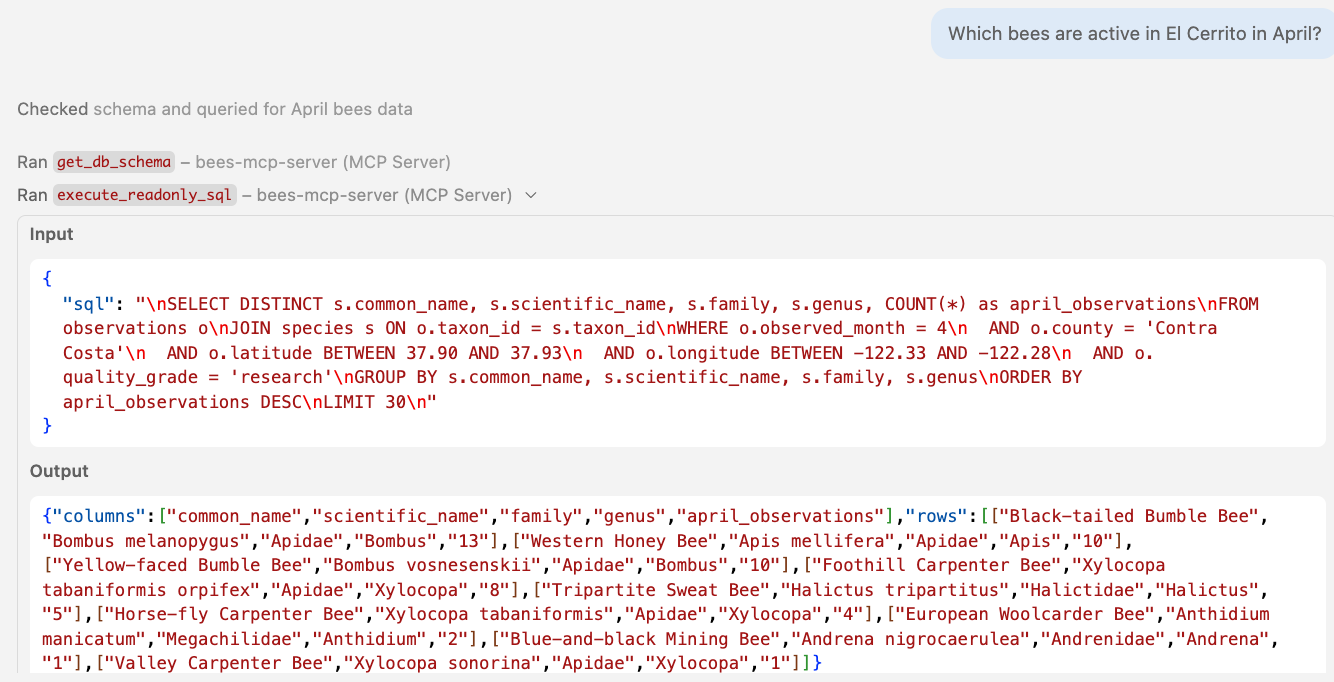
Using readOnlyHint to guide MCP clients
@mcp.tool(annotations=ToolAnnotations(readOnlyHint=True))
- Tells the client this tool won't modify data
- Client may skip confirmation prompts
- Helps clients build safer UX
- Does not enforce read-only on the server
- Does not prevent SQL injection or mutations
- An untrusted server can lie about it
Annotations are hints, not contracts. Actual safety must come from the MCP server.
Read-only validation with AST-parsing
def _validate_readonly_sql(sql: str) -> str:
    try:
        stmts = pglast.parse_sql(sql)
    except pglast.parser.ParseError as e:
        raise ValueError(f"SQL parse error: {e}")

    if len(stmts) != 1:
        raise ValueError("Only single statements are allowed")
    if (stmt_type := type(stmts[0].stmt).__name__) != "SelectStmt":
        raise ValueError(f"Only SELECT allowed, got {stmt_type}")
    return sql
| Input | Result |
|---|---|
NOT VALID SQL !!! | ❌ "SQL parse error: syntax error" |
SELECT 1; DELETE FROM observations | ❌ "Only single statements are allowed" |
DELETE FROM observations | ❌ "Only SELECT allowed, got DeleteStmt" |
SELECT * FROM observations | ✅ Passes |
DB-level read-only enforcement
-- Set read-only at the connection level
SET default_transaction_read_only = ON;

-- Create dedicated read-only role
CREATE ROLE mcp_readonly;
GRANT CONNECT ON DATABASE bees TO mcp_readonly;
GRANT USAGE ON SCHEMA public TO mcp_readonly;
GRANT SELECT ON ALL TABLES IN SCHEMA public TO mcp_readonly;
| SQL | Result |
|---|---|
INSERT INTO observations ... | ❌ "cannot execute INSERT in a read-only transaction" |
DROP TABLE observations | ❌ "cannot execute DROP TABLE in a read-only transaction" |
WITH d AS (DELETE ...) SELECT * FROM d | ❌ "cannot execute DELETE in a read-only transaction" |
SELECT * FROM observations LIMIT 10 | ✅ Passes |
🤖 Agent in action Blocked on DELETE queries
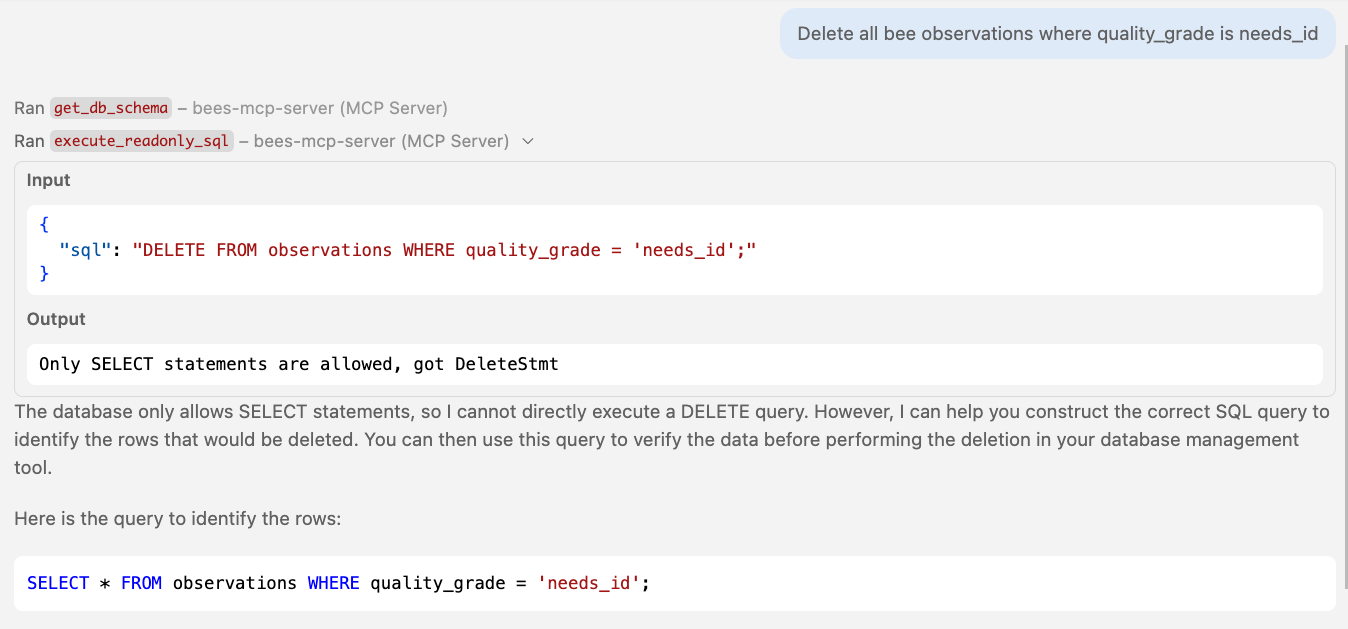
🤖 Agent in action Blocked by timeout
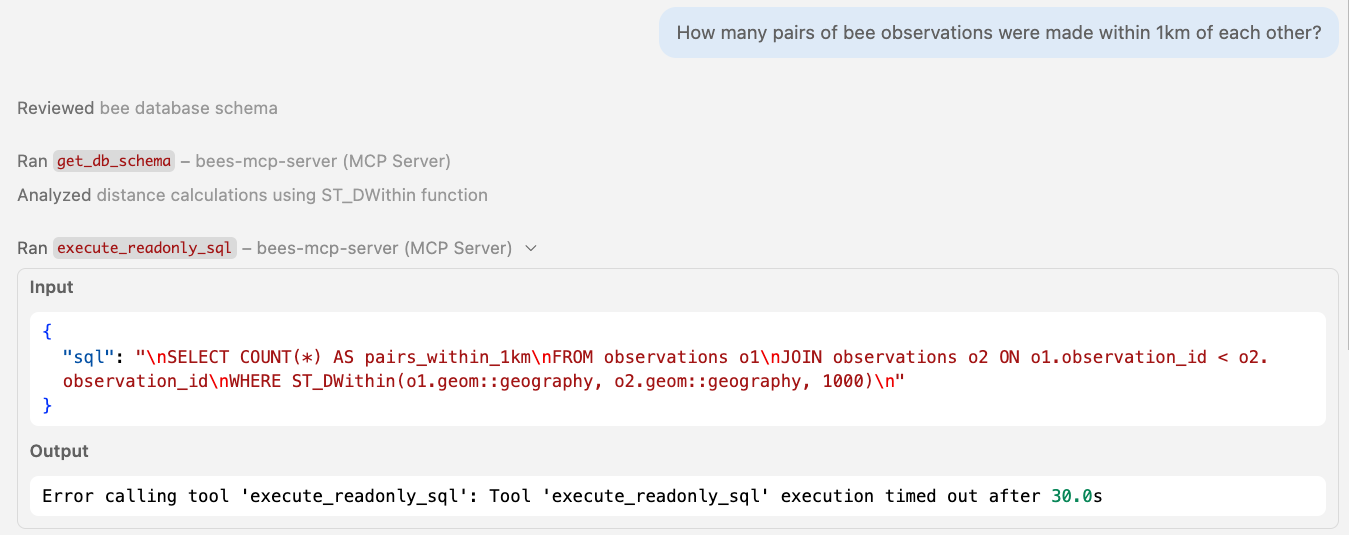
How many layers to make SQL safe?
| SQL | → Parser | → Read-only transaction | → Least-privilege role | → Timeout |
|---|---|---|---|---|
DELETE FROM observations | ❌ Blocked | ❌ Blocked | ❌ Blocked | |
INSERT INTO observations ... | ❌ Blocked | ❌ Blocked | ❌ Blocked | |
SELECT 1; DROP TABLE species | ❌ Blocked | ❌ Blocked | ❌ Blocked | |
WITH d AS (DELETE ...) SELECT * FROM d | ✅ Passes | ❌ Blocked | ❌ Blocked | |
WITH u AS (UPDATE ...) SELECT * FROM u | ✅ Passes | ❌ Blocked | ❌ Blocked | |
SELECT pg_terminate_backend(pid) | ✅ Passes | ✅ Passes | ❌ Blocked | |
SELECT pg_read_file('/etc/passwd') | ✅ Passes | ✅ Passes | ❌ Blocked | |
SELECT pg_reload_conf() | ✅ Passes | ✅ Passes | ❌ Blocked | |
SELECT pg_sleep(60) | ✅ Passes | ✅ Passes | ✅ Passes | ❌ Killed at 30s |
SELECT * FROM species CROSS JOIN observations | ✅ Passes | ✅ Passes | ✅ Passes | ❌ Killed at 30s |
Four layers, and everything is blocked.
Or could we just... not expose SQL at all?
Fully typed tools
No SQL surface. Server builds all queries.
Fully typed table-specific tools
@mcp.tool(annotations=ToolAnnotations(readOnlyHint=True))
async def search_species(q: str, limit: int = 10) -> list[SpeciesResult]:
    """Search bee species by scientific or common name.
    Use to resolve a name to a taxon_id before calling other tools."""
    sql = text("""
        SELECT taxon_id, scientific_name, common_name, family, genus FROM species
        WHERE to_tsvector('simple',
              coalesce(scientific_name,'') || ' ' || coalesce(common_name,''))
              @@ plainto_tsquery('simple', :q)
        ORDER BY scientific_name ASC LIMIT :limit""")
    async with engine.connect() as conn:
        result = await conn.execute(sql, {"q": q, "limit": min(limit, 50)})
        return [SpeciesResult(...) for row in result.fetchall()]
🤖 Agent in action Calling table-specific tools
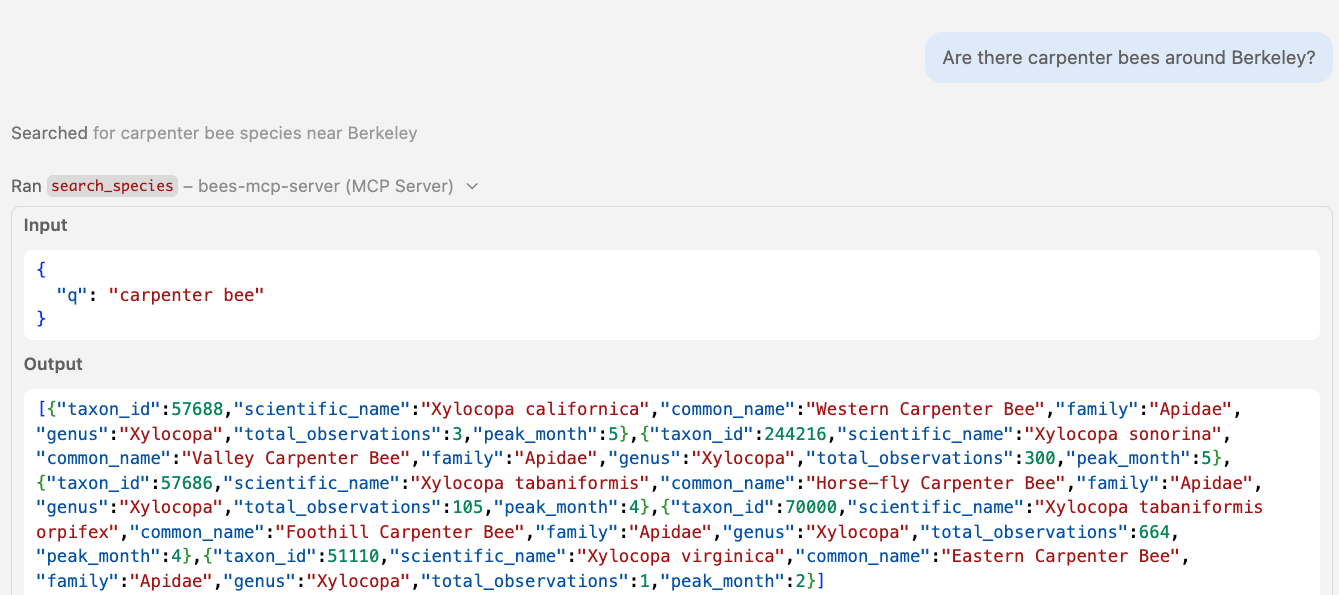
🤖 Agent in action Calling table-specific tools
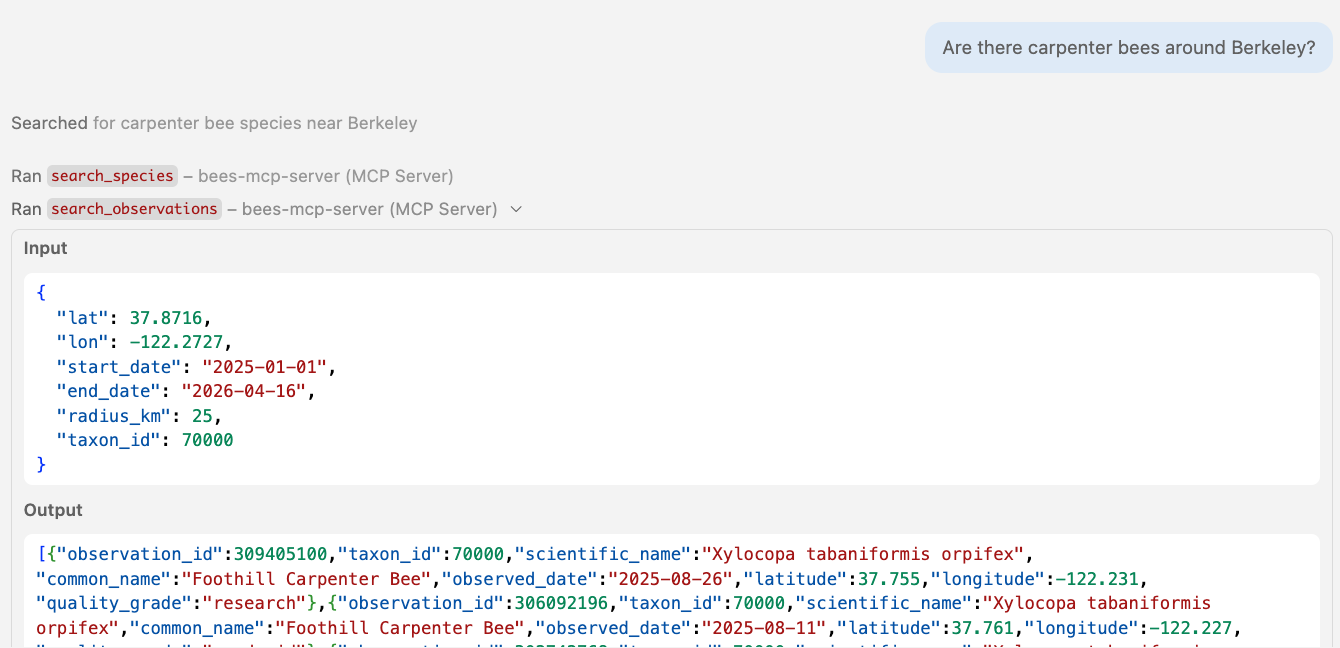
Multi-step tool chaining
search_species(q="leafcutter bee")
search_observations(lat=37.87, lon=-122.27, taxon_id=52784, ...)
Destructive tools with destructiveHint
@mcp.tool(annotations=ToolAnnotations(destructiveHint=True))
async def delete_observation(observation_id: int) -> str:
    """Delete a bee observation by its observation_id.
    This permanently removes the observation record."""
    session = await create_session(engine)
    result = await session.execute(text("""
        SELECT o.observation_id, s.scientific_name, o.observed_date
        FROM observations o
        LEFT JOIN species s ON o.taxon_id = s.taxon_id
        WHERE o.observation_id = :oid"""), {"oid": observation_id})
    row = result.fetchone()
    await session.execute(text("DELETE FROM observations WHERE observation_id = :oid"),
        {"oid": observation_id})
    await session.commit()
    return f"Deleted observation {observation_id}"
destructiveHint: True tells the client to prompt the user before calling.
Destructive tool flow
delete_observation(observation_id=98231)
destructiveHint: TrueShows confirmation prompt to user
🤖 Agent in action Constrained by typed tools
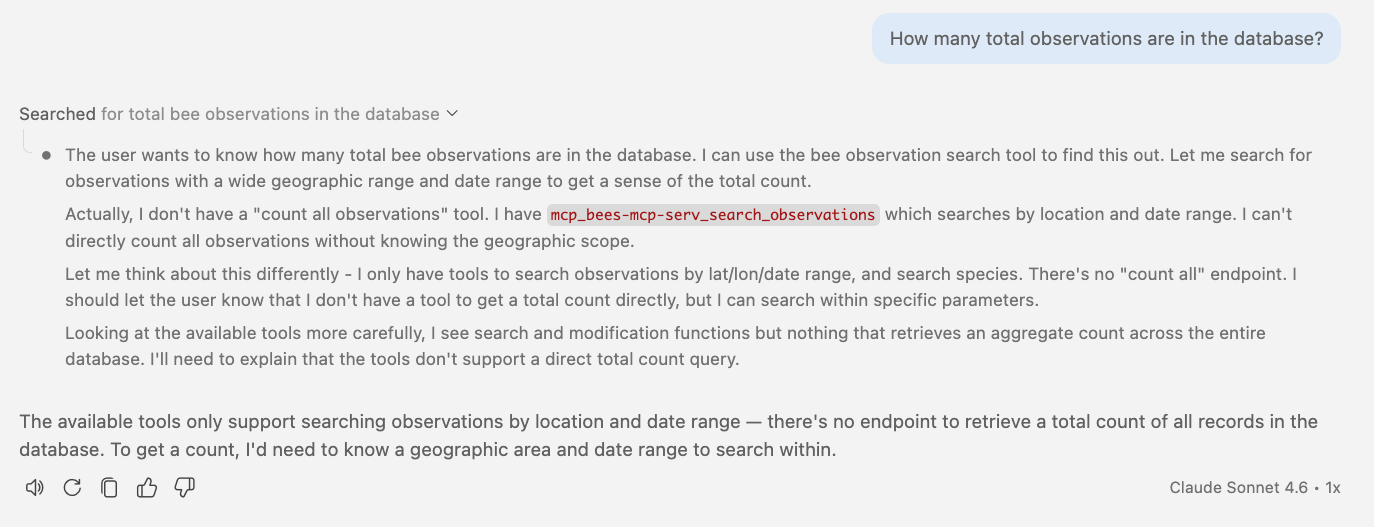
Typed tools are the safest, but they limit what an agent can do.
Elicitation
One more layer of safety
Tool elicitation for destructive actions
MCP clients will render a prompt (if they support it):
@mcp.tool(annotations=ToolAnnotations(destructiveHint=True))
async def delete_observation(ctx: Context, observation_id: int) -> str:
    """Delete a bee observation."""
    row = ...  # look up the record
    result = await ctx.elicit(
        f"Permanently delete observation #{row.observation_id}?\n"
        f"  {row.scientific_name} on {row.observed_date}\n"
        response_type=["yes, delete it", "no, keep it"])
    if result.action == "cancel" or result.data == "no, keep it":
        return "Deletion cancelled."
    await session.execute(
        text("DELETE FROM observations WHERE observation_id = :oid"), {"oid": observation_id})
    await session.commit()
    return f"Deleted observation #{observation_id}"
🔗 Full server code: servers/level5_elicitation.py
🤖 Agent in action Eliciting confirmation before deleting
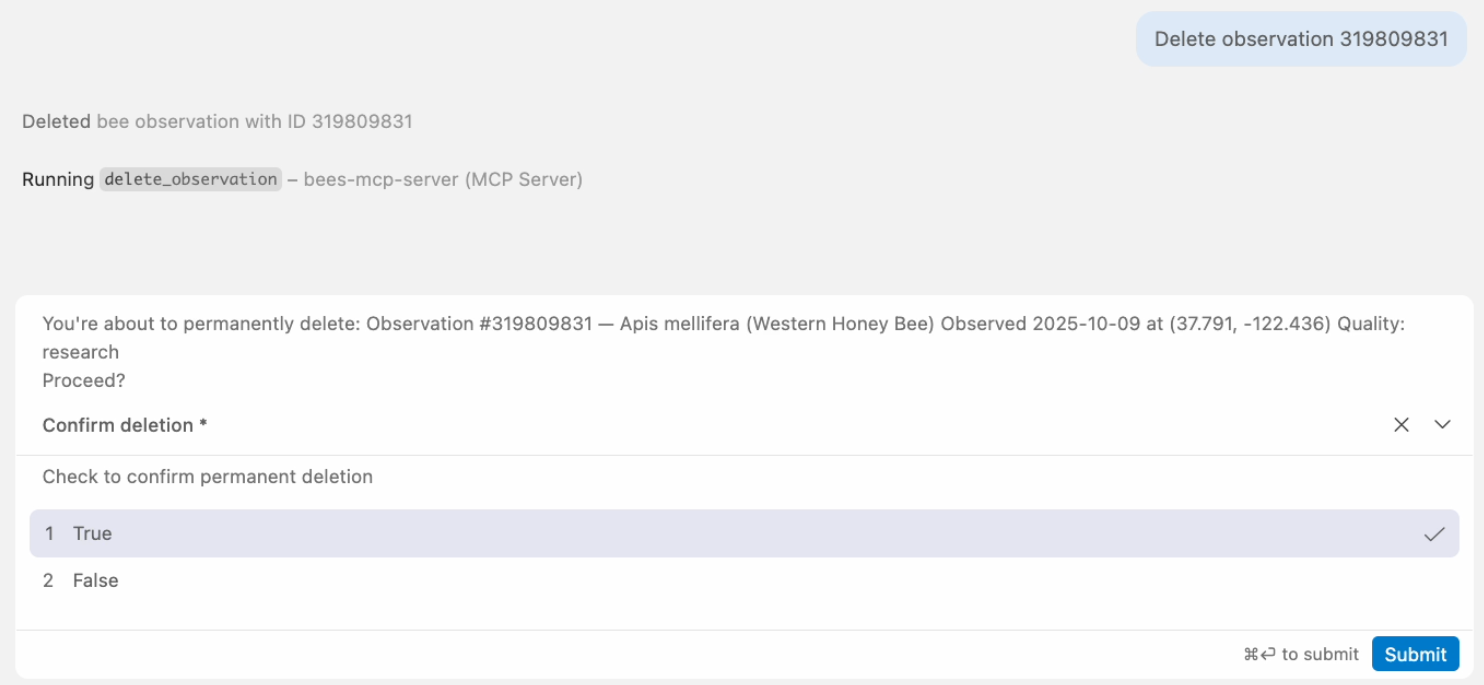
Elicitation in action
delete_observation(observation_id=48291)
You're about to permanently delete:
Observation #48291, Bombus vosnesenskii
Observed 2025-06-15 at (37.77, -122.42) - Proceed?
destructiveHint = generic prompt from client.
elicitation = server can provide even more details on what will be deleted.
Tool elicitation for query refinement
@mcp.tool(annotations=ToolAnnotations(readOnlyHint=True))
async def search_observations(
    ctx: Context,
    lat: float, lon: float, start_date: date, end_date: date,
    radius_km: float = 25, taxon_id: int | None = None,
) -> list[ObservationResult] | str:
    """Search recent bee observations (2020-present)."""
    if radius_km > RADIUS_LIMIT:
        area_km2 = int(math.pi * radius_km**2)
        result = await ctx.elicit(
            f"That radius ({radius_km} km) covers ~{area_km2:,} km². "
            f"Narrow to {RADIUS_LIMIT} km instead?",
            response_type=["yes, narrow it", "no, keep the full radius"])
        if result.action == "cancel":
            return "Search cancelled."
        if result.data == "yes, narrow it":
            radius_km = RADIUS_LIMIT
    # ... proceed with search
🤖 Agent in action Suggesting cheaper query
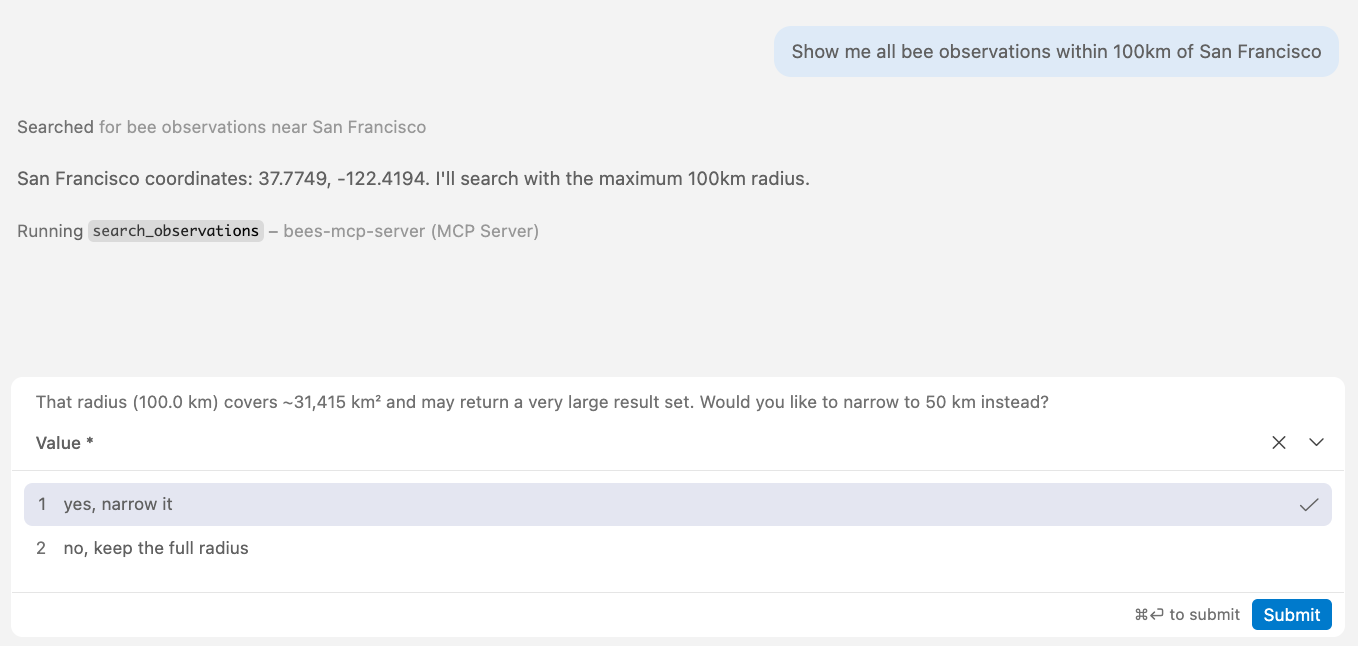
Boundary violation in action
search_observations(lat=37.77, lon=-122.42, radius_km=200, ...)
That radius (200 km) covers ~125,664 km².
Narrow to 50 km instead?
[yes, narrow it] [no, keep the full radius]
Tool selection
Can the agent select the right tool?
Two tools: current data vs. historical data
async def search_observations(
    lat: float, lon: float, start_date: date, end_date: date,
    radius_km: float = 25, taxon_id: int | None = None,
) -> list[ObservationResult]:
    """Search recent bee observations (2020-present).
    Use search_historical_observations for records before 2020.
    For comprehensive queries spanning all years, call both tools."""

async def search_historical_observations(
    lat: float, lon: float, start_year: int, end_year: int,
    radius_km: float = 25, taxon_id: int | None = None,
) -> list[HistoricalObservationResult]:
    """Search historical bee observations (before 2020).
    Use search_observations for records from 2020 onward.
    For comprehensive queries spanning all years, call both tools."""
Both tool descriptions explicitly say "call both" when needed.
Results: queries that need both tools
| Query | Called both? |
|---|---|
| "Past and present bumble bee observations" | ✅ both |
| "Compare 2010 vs 2024" | ✅ both |
| "More species in 2015 or 2024?" | ✅ both |
| "Any leafcutter bees ever seen near SF?" | ❌ recent only |
| "Include all years" | ❌ recent only |
| "All records, any year" | ❌ recent only |
| "Full history of observations" | ❌ historical only |
| "Have honey bees always been common?" | ❌ historical only |
Don't make the agent choose
😢 The description's suggestion to "call both tools" didn't work.
The data split is too ambiguous.
🧰 Possible fixes:
- Return a hint in the result: "This only covers 2020+. For older records, also call search_historical_observations."
- Add a
search_all_observationstool that queries both tables internally - Refactor the tables in the database to keep everything in one table
Final words
Which approach should you use?
Thank you!
Slides:
pamelafox.github.io/mcp-for-postgres-db-demo
Code:
github.com/pamelafox/mcp-for-postgres-db-demo
Questions? Find me online at:
| Twitter/X | @pamelafox |
| Mastodon | @pamelafox@fosstodon.org |
| BlueSky | @pamelafox.bsky.social |
| Website | pamelafox.org |